Serving auto updates to 1,997 websites
View latest updates
Changelog
Free with Every Membership

Keep Your WordPress
Site Updated Automatically

Chimp Updater makes it easy to manage updates, create backups, rollback, schedule, and more – all from your WordPress dashboard.
v3.4.2

Chimp Updater

Changelog

v3.4.2
  • Fixed: Bulk updates now show a working confirmation and update selected plugins and themes one at a time.
  • Fixed: The loading overlay now clears when the update list finishes loading, so you can continue without refreshing the page.
  • Fixed: Update Manager no longer checks the server every second while the update cache is taking longer to rebuild, reducing unnecessary requests.
  • Changed: Selection checkboxes now appear to the left of each item name, with consistent alignment and Chimp Updater colors.

v3.4.1 · 19 September 2026

  • Fixed: With automatic updates on but no item selected, this plugin stopped updating itself. Its own update no longer depends on there being items on the list

v3.4.0 · 19 September 2026

  • Changed: The usage report now says whether automatic updates are on for the site
  • Added: This plugin now keeps itself up to date, as the last step of the cycle, on sites where automatic updates are on
  • Added: Option on the Auto Updates screen to turn off only this plugin's own update, leaving the other items as they are
  • Fixed: With two updates running at the same time, a good package could be cancelled with a message saying its folder had the wrong name, when the name read belonged to the other item
  • Fixed: With two updates running at the same time, the check of the package version could read the version of the other item, or stop happening without notice

v3.3.0 · 17 September 2026

  • Added: Select several items on the management screen and update them in one queue, one at a time
  • Added: Schedule the check for a fixed time of day, next to the every-X-hours interval
  • Added: Ceiling of items updated per run, so a site with a long list becomes a queue that moves on its own instead of one heavy cycle
  • Added: Option to leave beta, alpha and rc versions out of automatic updates. Off by default, and they can still be installed by hand
  • Added: Export the configuration of one site and import it on the others. The token and the SMTP password stay out of the file
  • Added: White Label can hide screens from the client. A hidden screen leaves the menu and also refuses the direct address
  • Added: The new screens are translated into English and Spanish

v3.2.6 · 4 September 2026

  • Fixed: With the key already saved, the Settings screen could not be reached at all. That is where the key is removed and the licence details are shown
  • Changed: Updates is now the first tab, matching the screen the menu opens on

v3.2.5 · 4 September 2026

  • Fixed: With the key already saved, the plugin page opened on Updates but kept Settings highlighted in the tab bar

v3.2.4 · 3 September 2026

  • Fixed: A site that was already answering with an error before an update started had that update reverted and was told the update had broken it. The site is now read once before the run begins, and a fault that was already there no longer condemns anything
  • Changed: The menu opens on Updates when the key is already in place. A site with no key still opens Settings

v3.2.3 · 2 September 2026

  • Changed: After the server refuses a site three times in a row, update checks pause for an hour instead of retrying on every cycle. Saving a token or forcing a check resumes them immediately
  • Fixed: Sites running a regional variant of English or Spanish (en_GB, en_CA, es_MX and others) showed the plugin in Portuguese instead of the translation that ships with it
  • Fixed: Sites in a language with no translation now fall back to English

v3.2.2 · 17 August 2026

  • Changed: Internal cleanup. No functional change

v3.2.1 · 15 August 2026

  • Security: Stricter validation of where update packages come from. Custom CDN hosts go through the chimp_package_hosts filter
  • Security: Improved handling of data written to internal logs. Release builds were never affected

v3.1.4 · 14 August 2026

Version numbers now track the update engine, so the sequence jumps from 3.0.3 to 3.1.4.

  • Fixed: A failed download could never recover, because the spent single-use link kept being retried
  • Fixed: A successful update could be rolled back when the site answered 503 or 429 during the health check
  • Fixed: An aborted install could leave the site stuck in maintenance mode
  • Fixed: Child themes were offered updates that did not apply to them

v3.0.5 · 3 August 2026

  • Fixed: Items could be auto-updated even with Auto Updates disabled or paused
  • Fixed: Disabling Auto Updates could leave old checks scheduled
  • Fixed: "Run Check Now" button could start updates even when disabled

v3.0.4 · 3 July 2026

  • Changed: Updates that fail for transient reasons retry automatically
  • Fixed: Cache rules
  • Fixed: Design patterns
  • Fixed: Manual check button now schedules an independent cron event on every click
  • Fixed: New items added to management now have auto-update enabled by default

v3.0.3 · 29 June 2026

  • Changed: Improvements user interface
  • Added: Auto-update is now enabled by default for newly installed Chimp-supported items
  • Fixed: UI and rules bugs
  • Fixed: Toggle switches for Snapshots and Remote Legacy Versions not saving configuration

v3.0.2 · 29 June 2026

  • Added: Support contact interface for locked items
  • Added: Support for custom SMTP notifications
  • Added: Automatic smoke check after updates
  • Added: Local Snapshots system now mandatory
  • Added: WP Recovery Agent with auto-repair mode
  • Added: Multisite support
  • Added: White Label support
  • Added: English language support (en_US)
  • Added: Spanish language support (es_ES)
  • Added: Package item support
  • Added: System telemetry
  • Added: Manual control of Maximum Auto Update Type
  • Added: Popup to display plugin messages
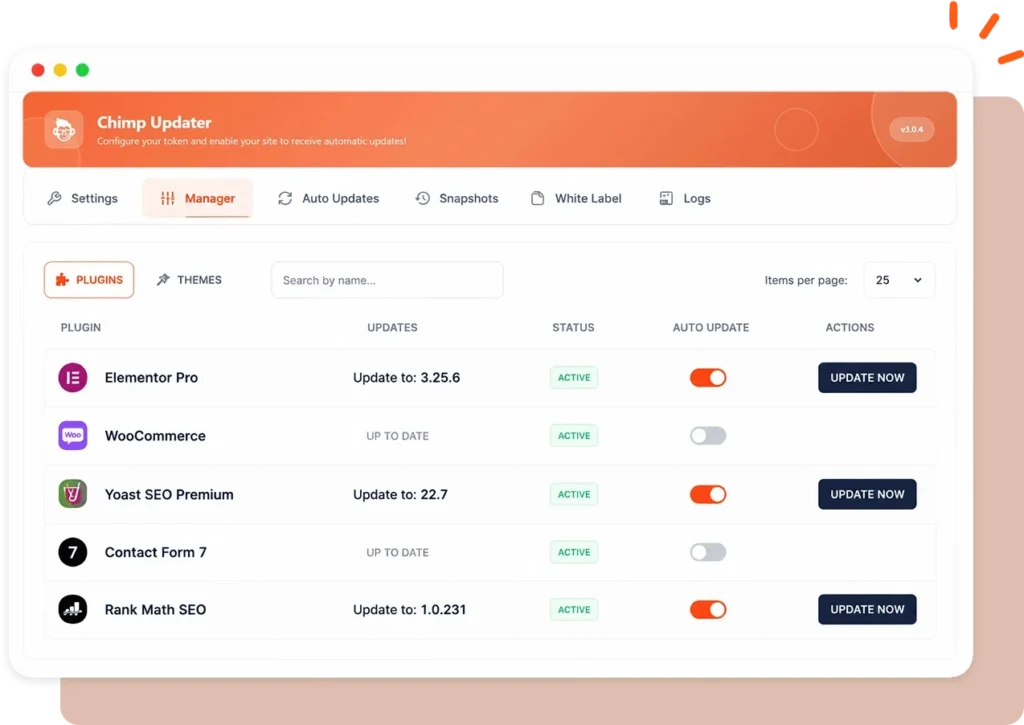
Chimp Updater dashboard showing available WordPress plugin updates
10k+
Updates Delivered
Installed on 1,500+
WordPress Sites
100%
Clean Virus Free Files
Built-in Safety Net

How Chimp Updater Protects Every Update

Lots of tools can update plugins automatically. What makes Chimp Updater different is what it does before and after each update.

1

Snapshot

A full copy of the current version is saved on your own server first.

2

Version Check

If the download’s version doesn’t match, the update is blocked before it touches your site.

3

Install

WordPress’s own updater installs it on your schedule. No FTP, no zip files.

4

Health Check

Your site is loaded to make sure it still works, and the result goes in the log.

5

Auto-Rollback

If the check fails, the snapshot is put back for you, even if wp-admin won’t load.

AUTO UPDATES1-CLICK ROLLBACKSNAPSHOTSRECOVERY AGENTWHITE LABELMULTISITE

Advanced Features

You Won’t Find on Other
GPL Sites

Most GPL sites stop at the download. Chimp Updater keeps every site updated, protected and recoverable, with no limits on updates.

Game Changer

Unlimited Updates on Every Connected Site

We removed the anxiety of download limits on updates. Why limit the one thing that matters most for keeping your site protected? Enjoy unlimited auto-updates with Chimp Updater.

Your daily download allowance stays untouched.

WP Recovery Agent

Site Crashed at 3 AM? It Fixes Itself.

Snapshots

A Restore Point Before Every Update

Every version is saved on your own server. Undo any update in one click, or switch back to an older release anytime.
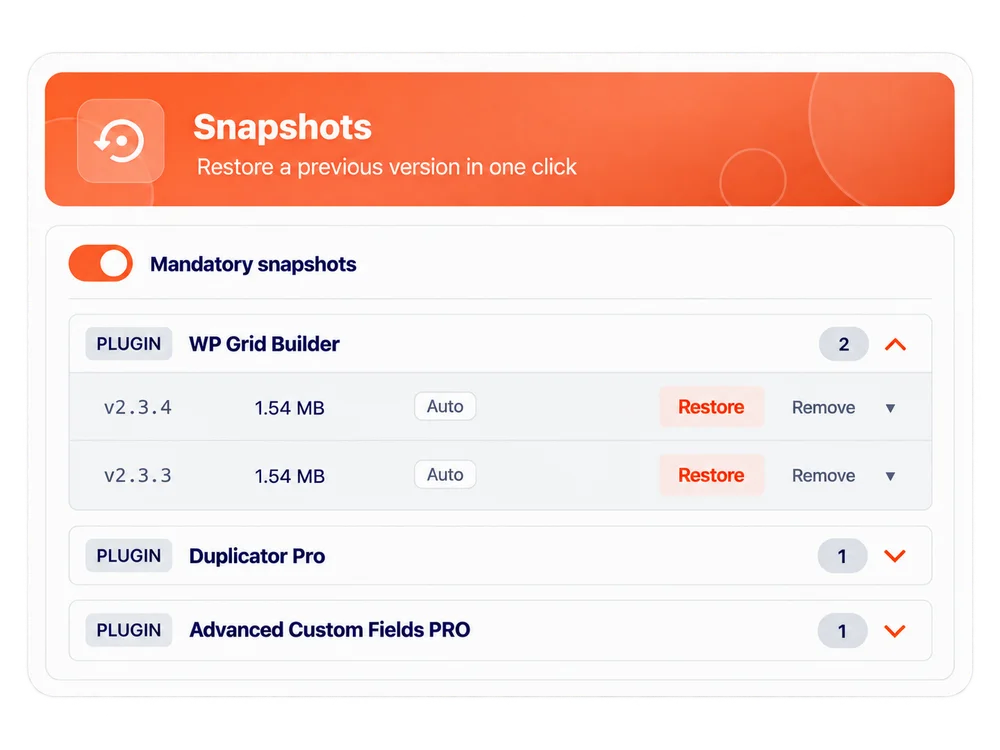
Saved plugin versions in Chimp Updater with Restore controls

For Agencies

White Label It as Your Own

Replace our logo, name and colors with yours. Your clients see a premium tool from your agency, not ours.
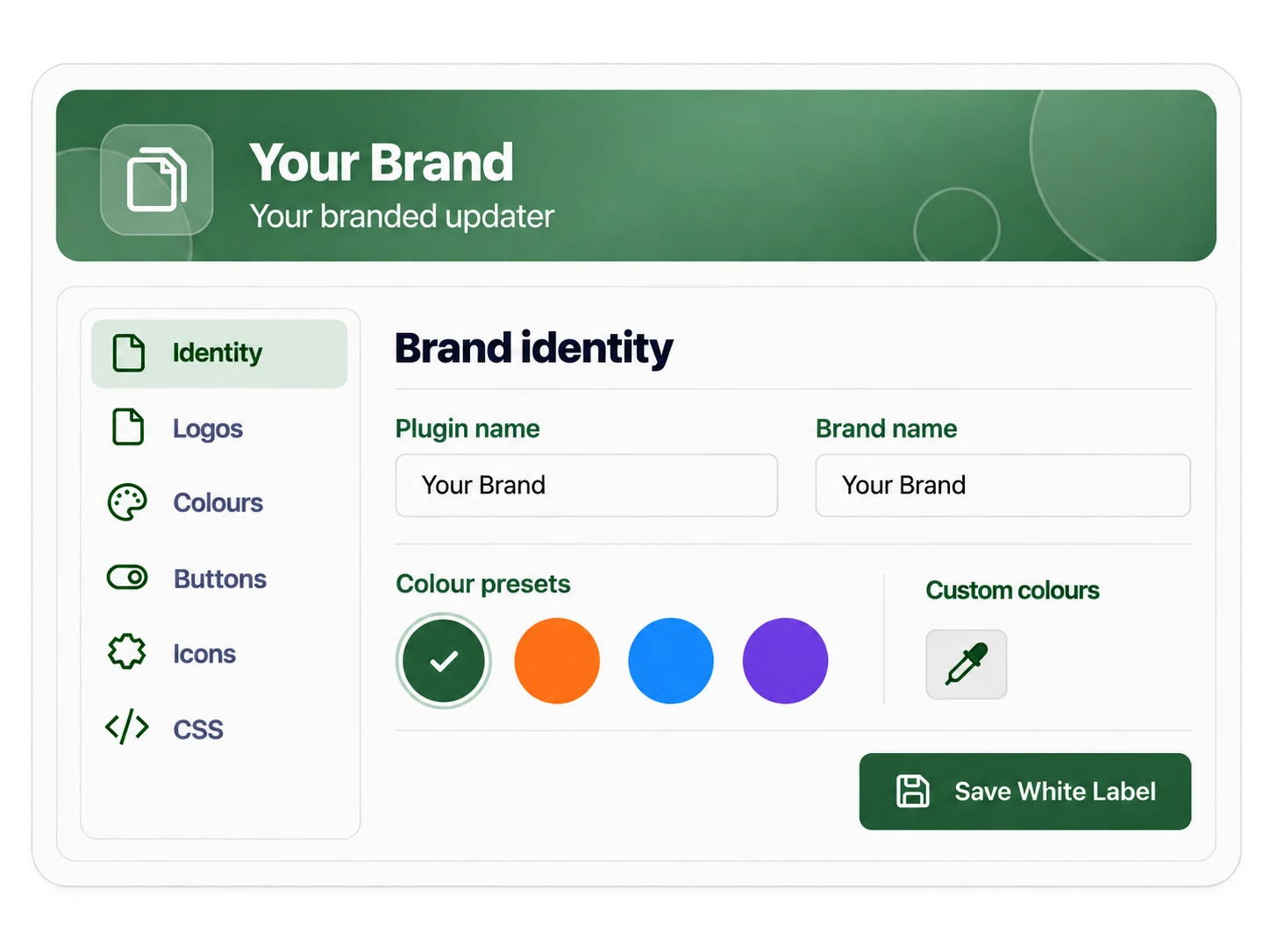
Chimp Updater white-label settings for your agency name, logo and colours

Plus Everything Else You Need

Scheduled Updates

Every 1, 6, 12 or 24 hours, or once a day at a set time.

Choose the Risk Level

Patch only, up to minor, or up to major. Skip betas.

Version Check First

A mismatched download is blocked before install.

Health Check After

Your site is tested after every update.

Bulk Update Queue

Update many items one after another.

Email Reports & Logs

Know exactly what changed, step by step.

Multisite Ready

Activates across the whole network.

Only What You Choose

Per-item control. Child themes are never touched.

Why It Matters

Updating by Hand Is Slow. Skipping Updates Is Risky.

Outdated plugins are a common way WordPress sites get hacked, and any update can also break something. Chimp Updater takes care of both.

Without Chimp Updater

Updates Are a Weekly Chore

With Chimp Updater

Updates Happen While You Sleep

Compare

A Smarter Way to Keep WordPress Updated

WordPress will update plugins for you, but it doesn’t take a snapshot first, check your site afterwards, or undo a bad update.

FeatureUpdates from developerManual updatesChimp Updater
How it worksEach plugin’s own updater, needs its own license keyDownload the zip, upload it, repeat for every siteAutomatic, from one dashboard
CoversOnly that one pluginWhatever you remember to updateAll your GPL Chimp plugins & themes
ScheduleBasic WordPress auto-updateWhen you find timeEvery 1–24 hours, or at a set time
Download limit—Uses your daily downloadsNever counted, unlimited
Snapshot before updating✕✕ (unless you back up yourself)✓
Health check + automatic rollback✕✕✓
Recovery when wp-admin is downWordPress recovery email onlyFTP work✓ Recovery Agent
Choose update level (patch/minor/major)✕You decide each time✓
White label for clients✕✕✓
For Members

Already a Member? Get Started in 2 Minutes

Install and activate Chimp Updater, then paste the key from your GPL Chimp account. Your website connects automatically—choose the plugins and themes you want to keep updated.

WordPress 6.0.3+
Tested up to WP 7.0
PHP 7.4+
Multisite ready
English · Español · Português
FAQs

Common Questions

What happens if an update breaks my site?

Chimp Updater saves a snapshot of the item before updating and checks your site afterwards. If the check fails, it puts the snapshot back. The WP Recovery Agent can restore the item even when WordPress won’t load. Changes an update makes to the database may need to be fixed by hand.

Does it really update without me clicking anything?

Yes, after one first click. The Recovery Agent needs your OK the first time (“Activate protection”). After that, updates run on the schedule you set, and you can get an email report after each one.

How do I get started?

Install the plugin, paste the token from your GPL Chimp account and approve your domain. Then turn on the Recovery Agent and switch on auto-updates for the items you want.

Will it touch plugins that aren't from GPL Chimp?

No. You choose per item whether Chimp Updater or WordPress manages updates. Other plugins are left alone, and child themes are never updated, so your changes stay safe.

Do you need my WordPress password?

No. It connects with an API token from your account, which you can replace or remove at any time. Each domain also has to be approved before it gets updates.

Can I use another update plugin as well?

We don’t recommend running two update plugins on the same site, because they compete for the same WordPress update system. Plugins with their developer’s own updater built in keep working normally.

Will it work on my site?

You need WordPress 6.0.3 or newer and PHP 7.4 or newer. It’s tested up to WordPress 7.0, works on Multisite, and is available in English, Spanish and Portuguese.

Stop Updating Plugins by Hand. Let
Chimp Updater Do It Safely.

Every update gets a snapshot, a health check and an automatic rollback if anything goes wrong.
