Document Library Pro
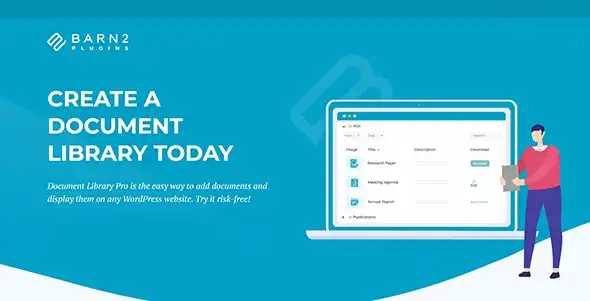
Document Library is a powerful WordPress plugin that works on a wide range of documents available on your WordPress site. It organizes, manages, and shares different kinds of documents such as PDFs, Word, Excel, PowerPoint, audio, video, and many more. It also designs reports, legal documents, training guides, media files, and research resources into a presentable and user-friendly library layout. This plugin is used by many bloggers, organizations, businesses, and educators to support a variety of documents directly from the front-end dashboard. It integrates seamlessly with Dropbox, Amazon S3, Google Drive, YouTube, or Vimeo to support documents within your WordPress Media Library.
Document Library has some advanced features like drag-and-drop uploads, CSV imports, preview and download buttons, filtering, sortable columns, responsive layouts, and granular access controls. You can download Document Library for free without investing any hefty amount.
Key Features
- Dual Layouts: Users can display their documents in a neat, sortable table or a visually appealing grid and table layouts. The table supports sortable columns, AJAX search, and filter dropdowns.
- Multiple Upload Methods: Users can upload documents on WordPress sites using manual upload, drag-and-drop, existing media conversions, or spreadsheet-based bulk imports via CSV.
- Audio, Video & Preview Support: Document Library provides audio, video, and preview support to embed players alongside each item.
- Filter, Search & Sort: Users can filter, search, and sort keywords from AJAX-powered filters including category, tag, and author.
- Document Analytics: Tracks analytics through both admin and frontend. You can also show author columns for richer metadata.
Steps to Download Document Library Pro from GPLChimp
- Visit GPLChimp and search for Document Library Pro.
- Download the Document Library Pro ZIP file.
- In your WordPress dashboard, go to Plugins → Add New → Upload Plugin.
- Choose the downloaded ZIP and click Install Now.
- Activate the plugin once the installation completes.
Frequently Asked Questions (FAQs)
Can I host documents externally?
Yes! Document Library Pro supports both Media Library uploads and external hosting via URLs such as Dropbox, Google Drive, YouTube, Vimeo, Amazon S3, OneDrive, etc.
Is front-end filtering available?
Absolutely! Frontend filtering is available for Document Library. You can also enjoy built-in AJAX search and filter dropdowns for tables, and sidebar-style grid filters.
Is Document Library Pro free or paid?
Document Library Pro is a paid WordPress plugin. But GPL Chimp offers you Document Library Pro for free without investing any hefty amount.
Changelog for Document Library Pro
Version 4.2.0 – Oct 18, 2026
- NEW: Added design templates.
- FIX: Incorrect sort with accented characters.
- FIX: Filter
document_library_pro_column_heading_link no longer working. - FIX: Adjusted regex for ACF field values.
- FIX: Filter
document_library_pro_data_title no longer working. - Updated Barn2 libraries.
Version 2.0.2 – 27 May 2025
- FIX: Custom taxonomy support in the new columns editor.
- FIX: Custom taxonomies and fields in the ‘columns’ setting were not migrated to the new editor.
- FIX: PHP warnings for custom taxonomies on document post type.
- Added filter for max cacheable table data size.
Version 2.0.1 – 14 May 2025
- TWEAK: Fallback for shortcodes using legacy options.
- TWEAK: Aligned download icon in grid layout.
- TWEAK: Removed conditional logic from “Document limit” setting.
- TWEAK: Added accent-insensitive search setting.
- TWEAK: New attributes in preview button anchor tags.
Version 2.0.0 – 06 May 2025
- NEW: Columns editor for easier column management.
- NEW: Redesigned settings for better UX.
- NEW: Clickable Filename column.
- NEW: Link destination for titles and filenames.